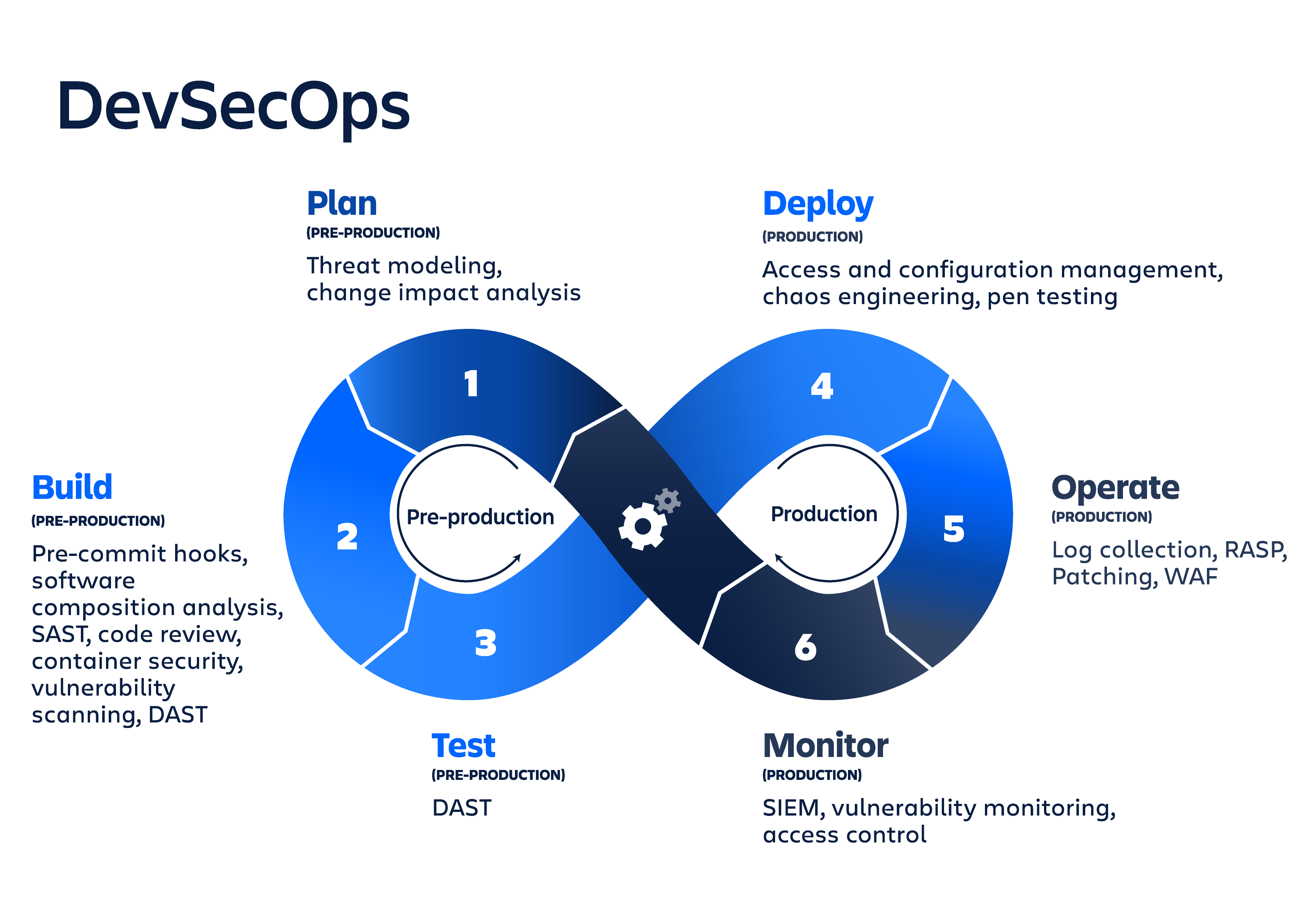
The era of reactive security is over. In 2026, as cyber threats grow more sophisticated and deployment cycles shrink to minutes, organizations are finally embedding security directly into the fabric of their DevOps pipelines. This is DevSecOps—not a tool or a team, but a cultural and technical imperative.

Shifting security left: Integrating automated security checks from code commit to deployment.
Key Takeaways
- Security is now a shared responsibility across development, security, and operations teams.
- Automated SAST/DAST tools catch 70%+ of vulnerabilities before code reaches production.
- Organizations practicing DevSecOps reduce incident response time by up to 90%.
- Policy-as-code and infrastructure-as-code are critical for maintaining compliance at scale.
From Reactive to Proactive: The DevSecOps Shift
Traditional security models treated security as a final gate—a manual, time-consuming review that happened right before release. In today's continuous delivery environment, that approach is not just inefficient; it's dangerous. DevSecOps changes the game by integrating security practices into every phase of the DevOps lifecycle: plan, code, build, test, release, deploy, operate, and monitor.
Old Model (Reactive)
Security check at the end → Delays releases → Creates friction → Security is a blocker
New Model (Proactive)
Automated checks in CI/CD → Immediate feedback → Security as code → Shared responsibility
The most successful organizations treat security as code. This means using version control for security policies, automating compliance checks, and ensuring that every infrastructure change is reviewed, tested, and approved through the same mechanisms as application code.
"DevSecOps isn't about adding more tools. It's about changing the culture. When developers, security engineers, and operations teams share the same goals and the same pipelines, security becomes an enabler, not a roadblock."
— Shannon Lietz, DevSecOps Pioneer
Key Practices Defining DevSecOps in 2026
1. Shift Left Security: The most cost-effective vulnerabilities are those caught early. Modern DevSecOps teams run static application security testing (SAST) on every pull request, giving developers immediate feedback on potential issues before code is even merged.
2. Automated Compliance as Code: Regulations like SOC2, HIPAA, and GDPR don't have to be obstacles. By codifying compliance rules (using tools like Open Policy Agent or Chef InSpec), teams can automatically verify that every deployment meets regulatory standards.
3. Continuous Threat Modeling: Instead of a one-time exercise, threat modeling becomes part of the design phase for every major feature, using automated tools to identify potential attack vectors based on architecture diagrams and dependency lists.
💡 Pro Tip for Engineering Leaders
Start with one security control—like SAST in CI—and measure its impact on vulnerability detection time. Use that data to secure buy-in for the next control (DAST, container scanning, etc.).
The DevSecOps Toolchain in Practice
A mature DevSecOps pipeline doesn't require a complete tool overhaul. It integrates security into existing workflows:
| Phase | Security Activity | Popular Tools |
|---|---|---|
| Plan/Codend | Threat modeling, secret scanningnd | GitHub Secret Scanning, TruffleHognd |
| Build/Testnd | SAST, dependency scanning, container scanningnd | Snyk, SonarQube, Trivy, Grypend |
| Deploynd | DAST, infrastructure-as-code scanning, policy as codend | OWASP ZAP, Checkov, tfsec, OPAnd |
| Operate/Monitornd | Runtime monitoring, anomaly detection, SBOM generationnd | Falco, Datadog, Wiz, Aquand |
Beyond Tools: The Human Element of DevSecOps
A 2026 industry survey found that organizations with dedicated DevSecOps enablement teams—responsible for training, metrics, and workflow integration—reported 3x faster recovery from security incidents compared to those that simply added security scanners to their pipelines. The most successful transformations also include:
- Security Champions embedded within development teams
- Blameless post-mortems that treat security findings as system improvements, not developer failures
- Game day exercises where teams practice responding to simulated breaches in production
🚀 Getting Started with DevSecOps
The Future of DevSecOps
As AI-generated code becomes common, DevSecOps is evolving to include AI-assisted security reviews. Early adopters are using large language models to review infrastructure-as-code configurations, suggest remediation steps, and even auto-generate security tests. The next frontier is autonomous remediation—where the pipeline not only detects vulnerabilities but also opens PRs with verified fixes.
One thing is clear: organizations that treat security as a continuous, collaborative process—not a final approval—will be the ones that move fastest without burning down.
Key Takeaways
- •This article highlights the latest trends in document technology
- •Practical insights for implementing PDF solutions in your workflow
- •Expert recommendations for document security and management